Today Ivana Saggion and I are talking about something called the hour of code. This is something we learned about at a great website called Khan Academy. This is, in our opinion, the best website for learning any topic you want to learn about. So go on, visit it, I'm sure you're going to love it.
For the class of informatic, we entered to Khan Academy and logged in. The teacher gave us a lot of things to do, we had to sign up in Khan Academy and complete the challenges/projects given by the program.
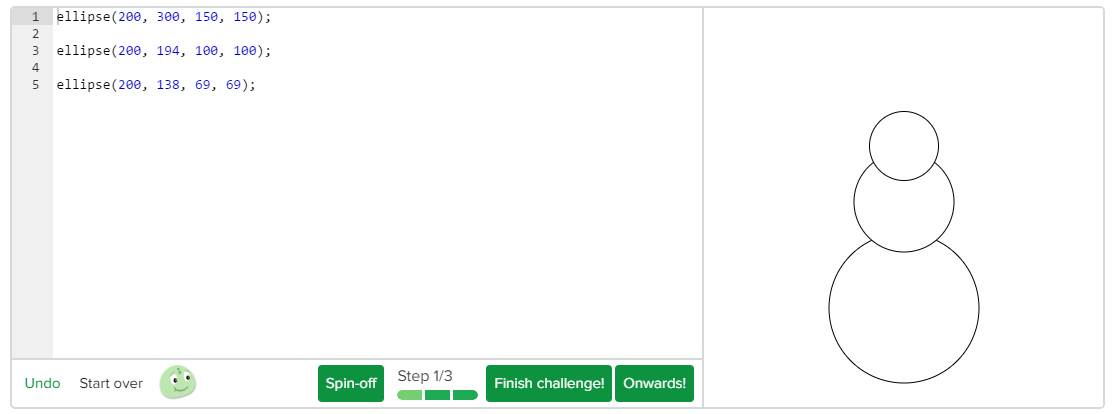
Here is a challenge we had to complete:
It has basic and simple codes that helps us to do all the projects!
And here, we have some important concepts you need to know if you are interested in coding:
When you use coding to, for example draw a snowman, you use specific commands or functions. This is a very important concept you need to know if you want to code. We could say, that a command is a set of words that gives the server a simple instruction he knows how to follow. For example, if we use the command known as ellipse, type some numbers inside the parenthesis and write a semicolon at the end, the server will immediately know what to do: draw a circle. When we talk about commands and functions we realize something: they have a lot in common with algorithms. These are also a set of instructions that follow a certain order so they can work: if you don't write them in a certain order, you might not be able of drawing or creating what you want to. Another concept we use, that we learned in class before, is the input and output. When we write the code, we are giving an input to the computer. The output is the result of our code, for example a line. The instruction we give is the input and the respond is the output.
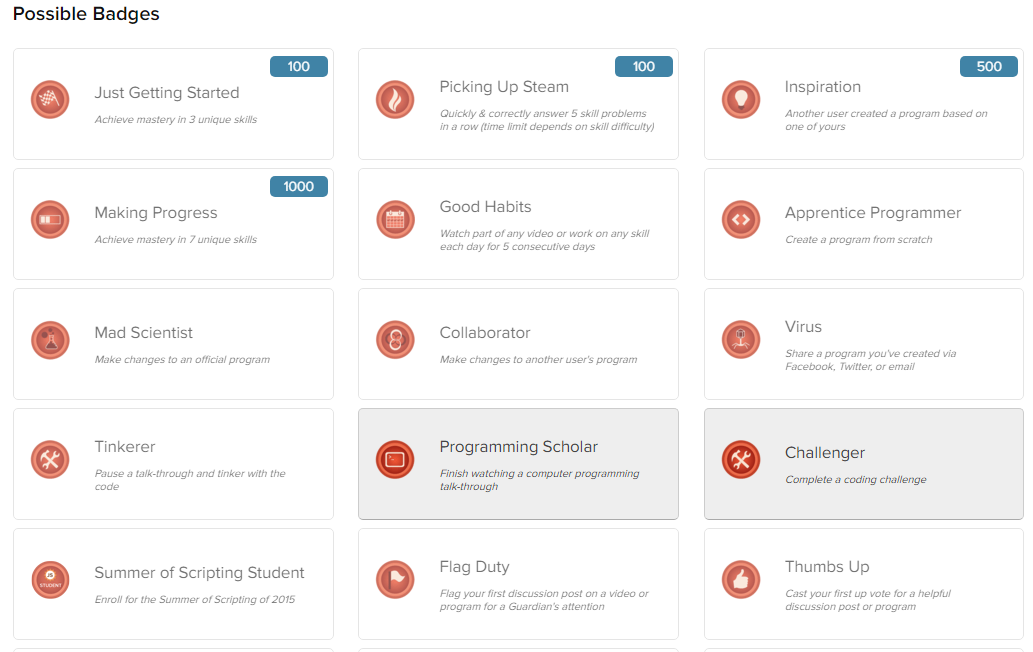
We win points when we complete the activities given by KhanAcademy and the badges are given by different reasons which you can see in the photo below.
And thats everything. We hope you had a great time, see you next time!
So about a week ago our informatic teacher told us about this site he really likes, Khan Academy where you can learn lots about math , science and lots of other like for example us about coding now I finished the first hour of coding and would like to tell you what I learned and what I have done in the definitely more than one hour of coding. I will also link you a video about coding for beginners if you feel like you need more than just this post to fully understand drawing with code.
so I hope you will learn something and let's get started.
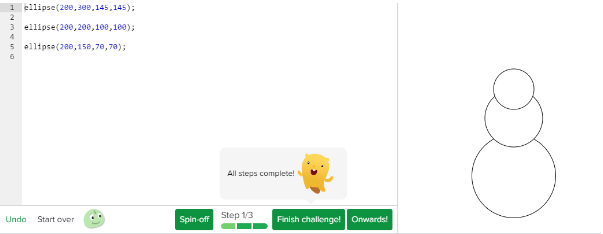
the first challenge we had to do was to make a simple snowman we just had to draw 3 circles this a very easy command just type ellipse(and the 4 different coordinates); so very trouble free. under this post, you can see the snowman I did.I don't think anybody will have trouble doing this so let's just skip to one of the first "real'' projects I did.
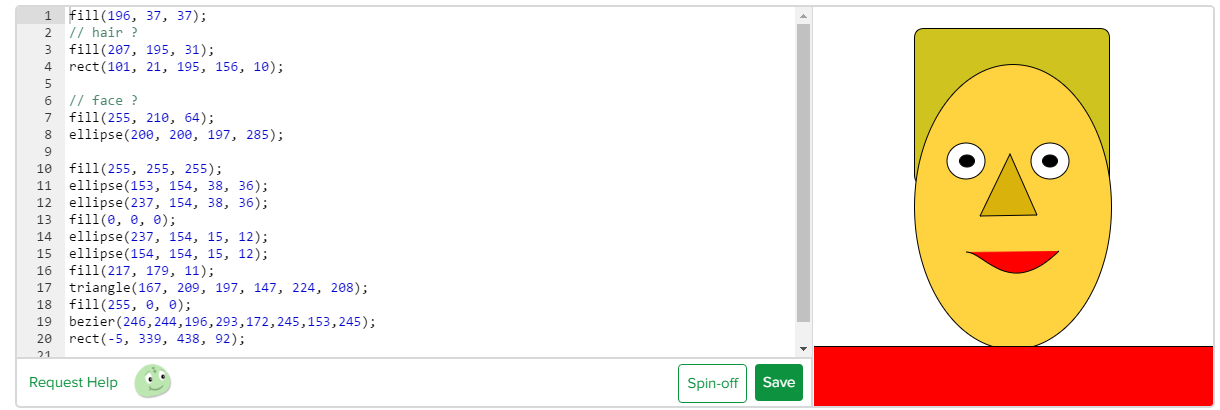
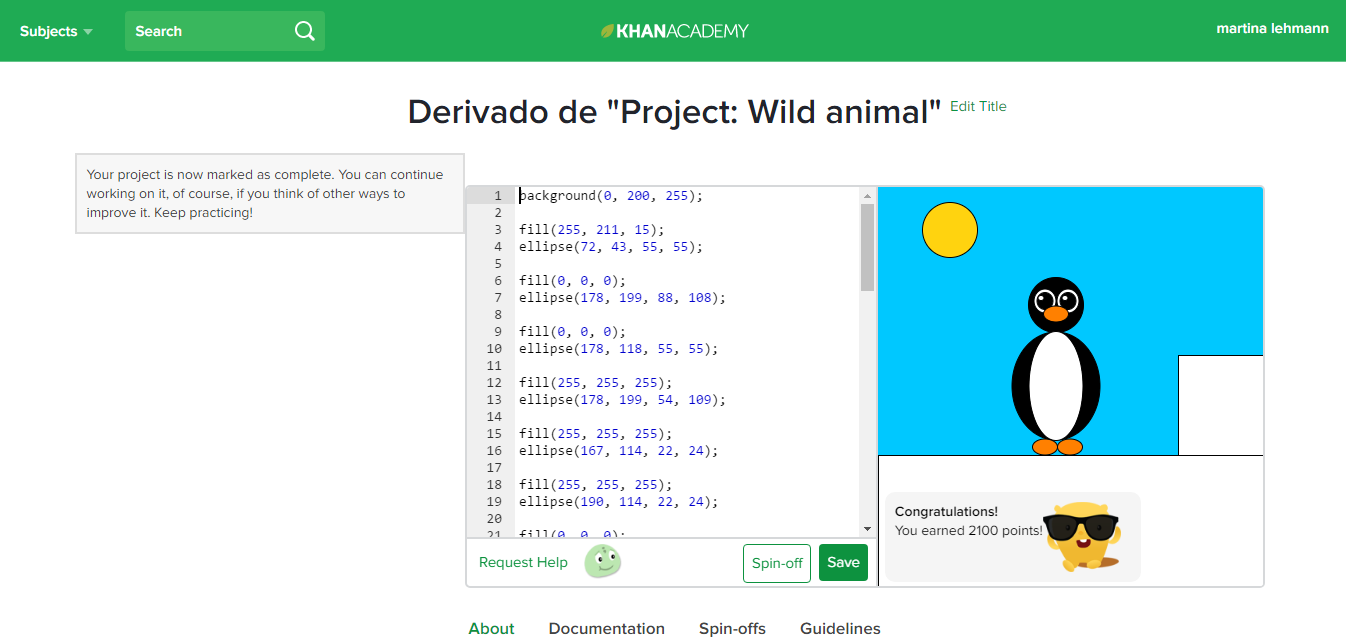
So on our first real project, we had to draw a self-portrait. for the hair I used rect(); and fill(); to color it. for the face and eyes I just eclipse(); for the nose, I used rectangle(); and for the mouth, I used bezier(); other projects I did were drawing a snowman with hands, a face and a hat. Another project I did was drawing a wild animal, all in all, it was a very fun and educational I'd recommend it to everybody who is interested in starting to code. At last, I wanted to talk about the energy points you earn so after each exercise you finished you would get some points this really helped me to work hard because I always wanted to have more points than my friends so a very good idea at the end I had 12700 points.
In this last week we are learning to use codes using the "Khan Academy" platform. Khan Academy offers practice drills, tutorials and a personalized learning dashboard that allows students to learn at their own pace, both inside and outside the classroom.
In this post we will explain our work, show our projects and prove what we learnt. First of all we created a new account synchronizing the gmail account with this platform. Then we watch a video that told us how to create forms and paint throw codes. We think that this website, will teach us how to program in a good way,interactive and easy. However we will never become experts,because it is not so sophisticated, we will be close enough.
The Challenges:
Now we are going to talk about the challenges we have completed. Using the scrips, which we had learned with Khan Academy, we painted a snowman.
So was the process:
The Projects:
Although the Challenges was´t easy we were expected to make a bigger effort. He had to do our projects: We had to choose between painting a wild animal, a self portrait or a super snowman.
This is how our projects look like:
You can see the complete project including scripts here:
First of all I recommend watching these videos, to get introduced to the topic.
Some important concepts:
Background:
The background is used to to give a color to the project. To create the Background you need to write a specific code: background(r,g,b);. The r is the amount of red. The g is the amount of green and the b is the amount of blue.
Point:
The point is used for example to build an eye (the iris). the code of the point is: point(x, y);. The x is the x-coordinate of the point (it moves to the left or to the right).
Rectangle:
The rectangle is used for example to draw hair. To create a rect you need to write this code: rect(x, y, width, height, radius);. The x is the x-coordinate of the top left corner. The y is the y-coordinate of the top left corner. The width is the width of the rectangle. The height is the height of the rectangle and last but not least the radius is the radius of the corners, to round the rectangle (do not forget that the radius is optional).
Our Profiles:
Last but not least, we´ll share our profiles with you. We are not going to present ourselves, because we already did it in an older post, so we let you the link to that post.
This week we were working with the website Khan Academy, we were drawing with code, it's a really fun and different way of drawing. At the first look this kind of drawing seems to be difficult, but once you catch how it works it's really easy.
Khan Academy is a really complete website to learn a lot of different things. We can also use it to learn maths, science, computing, arts, humanities, economics, finance, engineering, and a lot more.
It has video tutorials for you to understand what you have to do and documents that explain certain topics. Its friendly to use and you learn a lot with it. Here is a short video to show you how to use it.
We have worked with the topic drawing with codes, after all the lessons we needed to make 3 different projects to prove that we know how to draw with code. Our teacher can monitorize our activities and see if we worked in our homes, because khan knows when the IP is from a normal computer or a computer from a school (if you wanna know your IP nummer visit this page what is my IP adress?). This are our projects:
This snowman is from Migue.
This penguin is from alois.
We really enjoyed this website, because you can learn a LOT of things related with school and this could be really useful, because of the easy and intuitive way of teaching that this website has. This website also counts with a system of points, which you earn by studying in Khan or when you finish an exercise, we believe it is a really cool idea, because it inculcates the user to keep on learning. We hope, you will start learning in Khan Academy.
Hi everybody! A few weeks ago we started working and learning in an online platform called drawing with codes. This page has a special system where each one has an account but everyone has the same task. This task has different steps that we have to complete. Some are videos that we have to watch, others are documents that we have to read and after that we have challenges that we have to do and once we complete them we get points. When you get points you win awards!
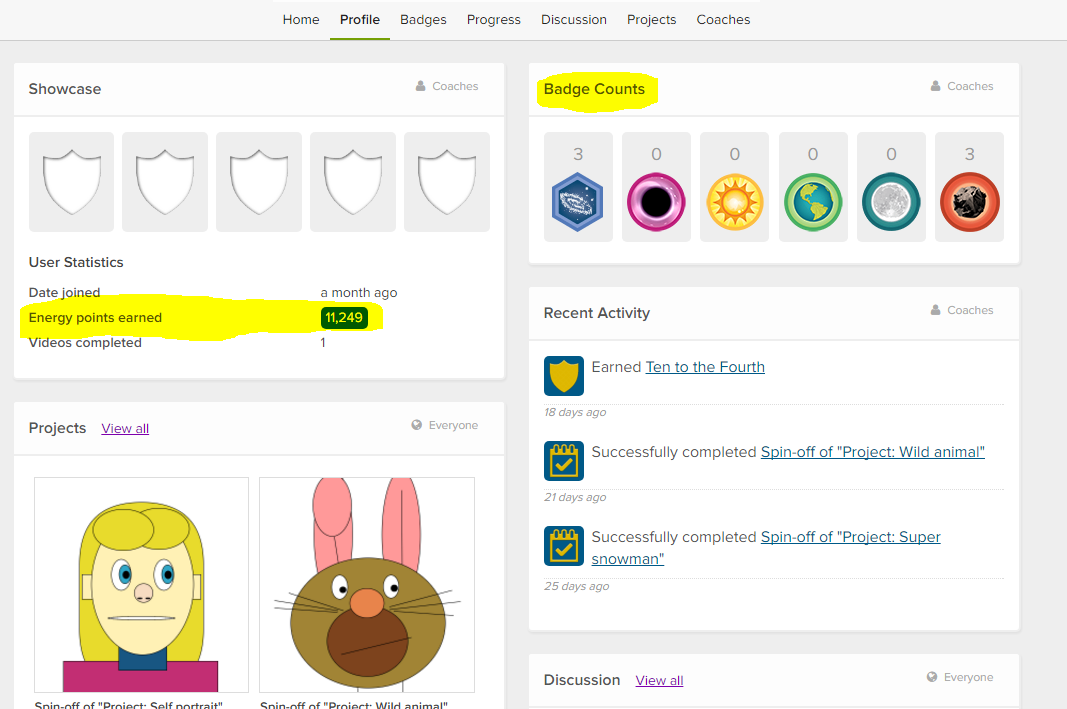
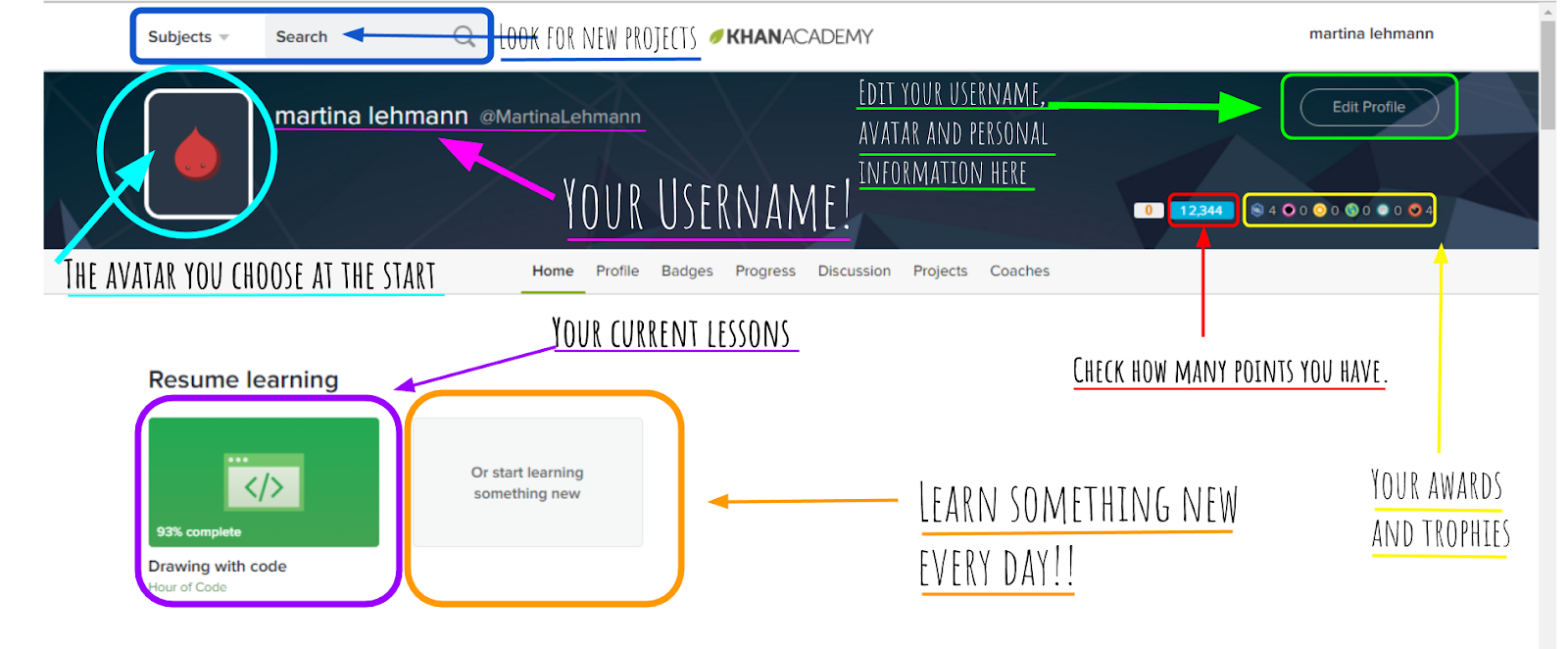
This is your profile, were you can see your profile picture, that looks like a monster. At the beginning he is very small, and by geting points he can get bigger. At the beginning you can choose the colour of the monster. You can also see your earned points, your process, your badges, that are some kind of achievements, and also all the projects that you did.
The first challenge that we had to do was to draw a simple snowman. Like you can see we only need three circles and to draw them we will need to use a special code that starts with the word “ellipse” (that means circle) and inside this () we will have to write numbers for the x-coordinate of the centre of the circle, y-coordinate of the centre of the circle, w for the width of the circle and h for the height of the circle. If you want to change the place of the circles you can try changing the numbers. On the up-right-corner you can see that, to help you, Khan Academy tells you some numbers to start with.
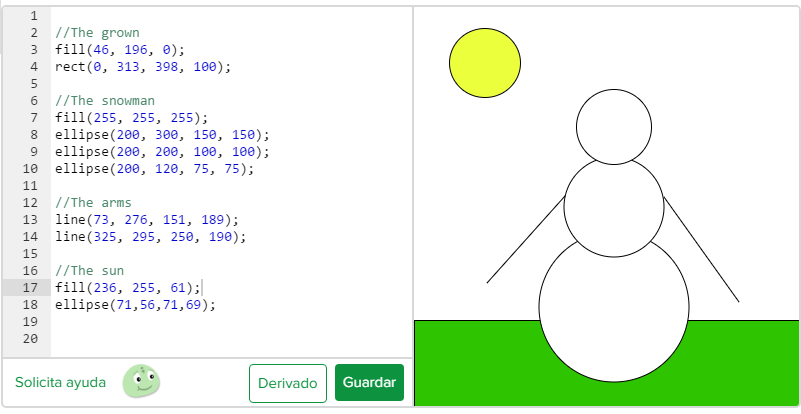
This is an example of a project called "wild animal" that one of us made. On the left side is all the coding. It looks difficult to understand, but actually it is very simple. You only have to write the command of the form that you want to use, and then between the parenthesis, the coordinates. And in the right side, you can see what you are drawing.
Underneath a project there is always some help like this one:
If you want to, you can click this link and see how it works:
Hello everybody! Last week we have been working in an online platform called Khan Academy. In this website you can learn absolutely anything that you can imagine. We learned something that's called ''Drawing with code''. We both liked this new experience a lot. It is a very fun way to learn, because in the process you watch tutorial videos and you complete challenges. While you complete the tasks, you get points and awards.
In the following, we will show you our drawings, our profiles, what we did and explain you what this is about. Let's get started!
Here we can see how your profile looks like. You are able to see you profile picture, that looks like a monster. At the beginning he is very small, and by geting points he can get bigger. You can also see your earned points, your process, your badges, that are some kind of achievements, and also all the projects that you did.
These are the badges that I earned.
This is an example of a drawing that one of us made. On the left side is all the coding. It looks difficult to understand, but actually it is very simple. You only have to write the command of the form that you want to use, and then between the parenthesis, the coordinates. And in the right side, you can see what you are drawing.
Hello! We are Francesca and Martina, today we are doing a blog that is going to be a little different than the other ones.
Last two Informatic class we used a new method, in this a web page, to learn.It is called Khan Academy. Khan Academy is a educational website that contains free videos tutorials and interactive exercises.You can register as a student, a teacher or as a parent. This gives you different control over the things. For example: a teacher can create something that is called lesson, see the progress of the students and how much they spent working in a certain period of time.You also earn points every time you finish a chapter from the lesson. In this post we want to show you my progress on the web site and give you a resumed information about the topics that our lesson contains.
You are going to learn how to use the language of JavaScript, doing drawings with different codes, and the library ProcessingJS.
Our first challenge after the first tutorials was drawing a simple snowman:
(Martu’s work on “Challenge: Simple snowman”)
This one was our first challenge and as you can see they gave us a little help with the first codes and also corrections to make our work better.On the right corner
Our first challenge after the first tutorials was drawing a simple snowman, and these are our results!
(Fran’s work on “Challenge:Simple snowman”)
But before starting with the project, we watched one of the tutorials, where we got explained how to do it. Without this explanation it would have been impossible for us to achieve the challenge on our own. This video was not only very informative, it was short and very easy to understand. We highly recommend you to watch the tutorials in the Khan Academy page and not for example in Youtube, because you don’t get points if you watch it in another platform.
And points are very important so that your teacher can know how much do you work ;)
As you can see in each lesson they tell you how many points you win!
Points are also very important for YOU to see your progress and how are you going with the lesson in general and they also motivate you to continue.
Tutorials
In reference to the videos that give you the information to complete the challenges, we think they are great.They explain you in a very short time basic concepts that you need to know in a very simple way.
You can always work on your projects any time you want and you can always achieve goals in your lessons.We had three very important projects, one we had to do a “Super Snowman”, the second one was doing a wild animal and last but not least doing a self portrait.
We both think the best project or challenge was the one with wild animals because we could put lots of details and also use the animal we liked the most!
These projects take a little bit more of time than the others but they are worth it because there are amazing results!
(Martu’s “Wild animal” project)
A little bit about the Web Page:
In the next paragraphs we are going to tell you what means what on the start page and also for what can you actually use Khan Academy? For this last thing we are going to leave you a video from: Khan Academy!!
(Screenshot about: what do we see on the home page)
Here we leave you the the video from Khan Academy so that you can understand for what to use this useful and awesome website. If you cant play the video please try with the following link: